

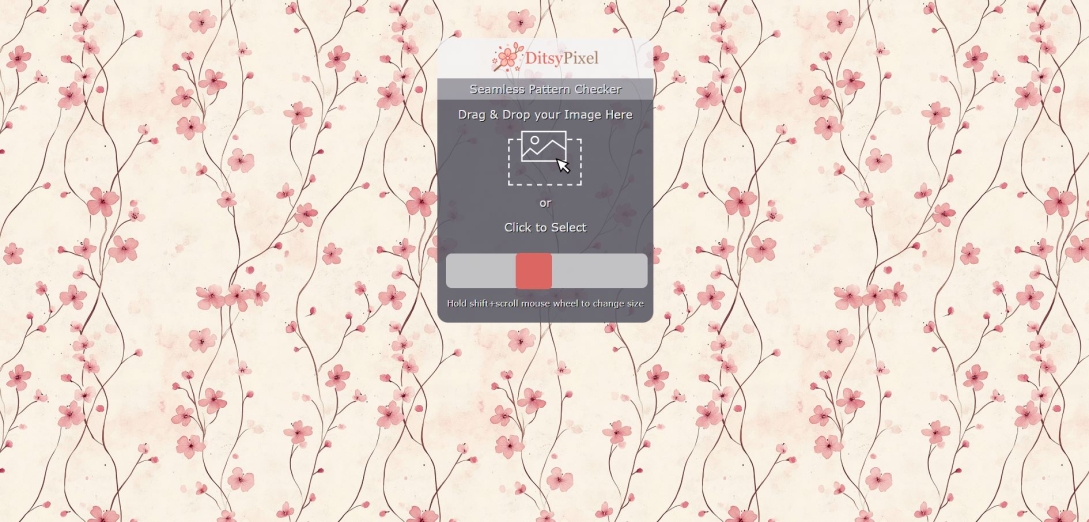
Does Your Pattern Really Repeat Seamlessly?
I have needed to check whether my patterns were truly seamless many times while making designs. A tile can look perfectly tidy on its own, yet a small gap or misplaced detail only becomes noticeable once several copies sit together.
The DitsyPixel Seamless Pattern Checker gives you a way to view that repeat before you use your design in a finished project. It is a useful check when you have spent so long arranging the individual elements that the joins are easy to overlook.
Why check the repeat?
A seamless pattern needs to meet correctly along every edge. Anything that continues beyond one side of the tile must line up with the matching detail on the opposite side.
Even a slight mismatch can leave a visible break when the design repeats across fabric, paper or a larger digital background. Checking the tiles together lets you see those joins in context, where a small error can become surprisingly obvious.
How to use the checker
Start with the image you intend to use as your repeating tile. Use the tile itself, without any extra border or space around it, as that would become part of the repeat.
Drag the image into the checker, or choose “Click to Select” and pick your file. Once it is displayed, hold Shift while scrolling your mouse wheel to change the size.
Look closely at the joins first, then view the pattern at a smaller size to see how the whole arrangement reads. Both views are useful: one helps you inspect the details, while the other shows the rhythm of the design.

What to look out for
Follow the places where the tiles meet. Watch for thin lines, unexpected gaps or motifs that seem to jump sideways instead of continuing smoothly. Curves and diagonal strokes are especially useful to inspect because a slight shift can interrupt their shape.
Pay attention to the corners too, where four copies meet. An overlooked detail here can create a repeated hole or an unusually crowded patch.
Then let your eye travel across the wider pattern. The edges may join perfectly while the arrangement still forms obvious rows, empty channels or clusters that feel too heavy. These are questions of spacing and balance, rather than faulty seams, but they are much easier to judge in the repeated view.
Adjust and check again
If something catches your eye, return to your original design and adjust it there. Export the revised tile and bring it back into the checker for another look.
Check the surrounding area as well as the detail you changed. Moving one motif can improve a gap while making its neighbour feel crowded, so give the whole repeat a final look before calling it finished.
LEAVE A COMMENT
Recent Posts








0.0581